
On this page
The problem: marks reach the office on paper
In many schools in Bangladesh, subject teachers write marks on paper mark sheets and hand them to the office, because only the office uses the school software. The office then types every mark again, and attendance stays in each class's register.
Mark sheets wait at one desk
After every exam, each subject teacher's mark sheet waits at the office until someone has time to type it in.
Every mark is written twice
The teacher writes it on paper and the office types it again, so one misread digit can give a student the wrong grade.
A shared login opens everything
When teachers borrow the office's login to enter marks, they can also open fees, teachers' salaries and every other class.
Attendance stays in the register
The attendance register stays in the classroom, so the office learns who was absent only when someone checks the book.
How EduFusion solves it
EduFusion gives each teacher their own login to a portal made for the phone. Each teacher takes attendance, enters marks and makes question papers for the classes and subjects the admin assigned, and the office sees the work as soon as it is saved.
Before
Paper mark sheets typed again by the office after every exam, attendance in a register, and one shared office login if teachers use the software at all.
With EduFusion
Each teacher signs in on their own phone, enters their subject's marks and today's attendance, and sees only their own classes. The admin still publishes the results.
What's inside EduFusion's teacher portal
Everything a subject teacher needs on exam days and ordinary school days, and nothing they shouldn't see.
A teacher login, given by the admin
On a teacher's page, the admin opens Portal access and gives the teacher a login: their own email and a first password the admin types. The admin can reset the password or turn the login off, and a teacher set as Inactive, Resigned or On Leave can't sign in.
Only their own classes and subjects
Each teacher sees only the classes and subjects the admin assigned to them, never another teacher's. The school's student list, fees, salaries, accounts, SMS, WhatsApp and settings aren't in the portal at all.
One dashboard for the whole day
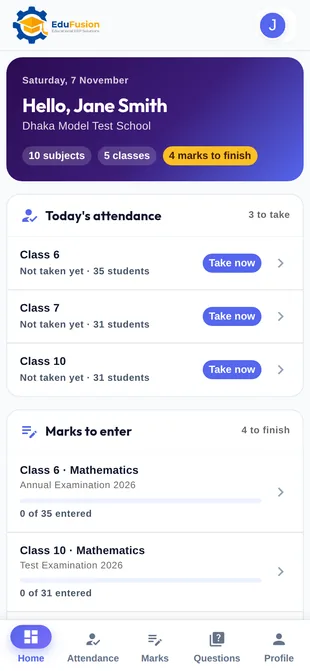
The home screen shows the attendance still to take today, with a Take now button, the marks still to enter for each exam subject ("0 of 35 entered"), upcoming exam papers, the teacher's classes and subjects, and their latest question papers.
Today's attendance in a few taps
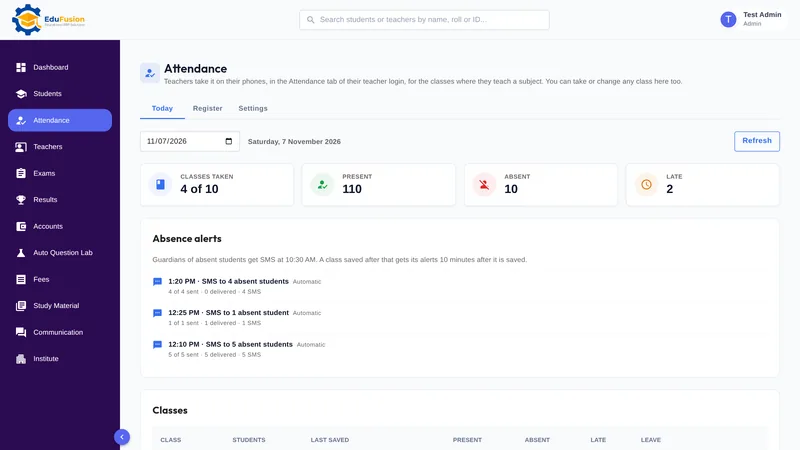
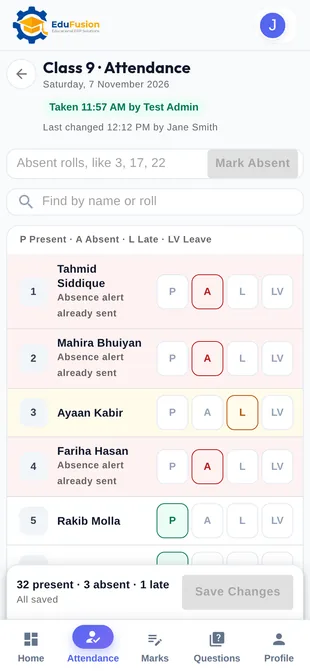
For each class where they teach a subject, the teacher takes today's attendance. Everyone starts as present; a tap marks a student A (absent), L (late) or LV (leave), or the teacher types the absent roll numbers, such as "3, 17, 22". A teacher can change today's attendance only. More in our guide to student attendance software.
Marks entry on the phone, one subject at a time
The teacher picks an exam subject and gets one card for each student who takes it. The marks box opens the phone's number keypad, a switch marks the student Present or Absent, and the Save bar stays on screen. Marks typed but not yet saved stay on the phone, and grades and GPA are worked out from your grading rules as marks are saved.
Question papers for their own subjects
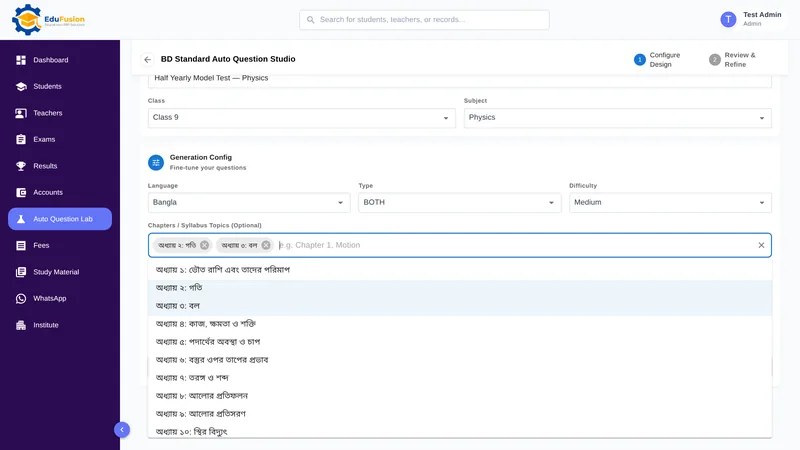
In Questions, teachers use the Auto Question Lab for their own subjects. It drafts MCQs and creative questions automatically from NCTB chapters or a syllabus PDF, and the teacher checks and edits every question before saving. Each teacher sees only the papers they made.
The admin stays in control
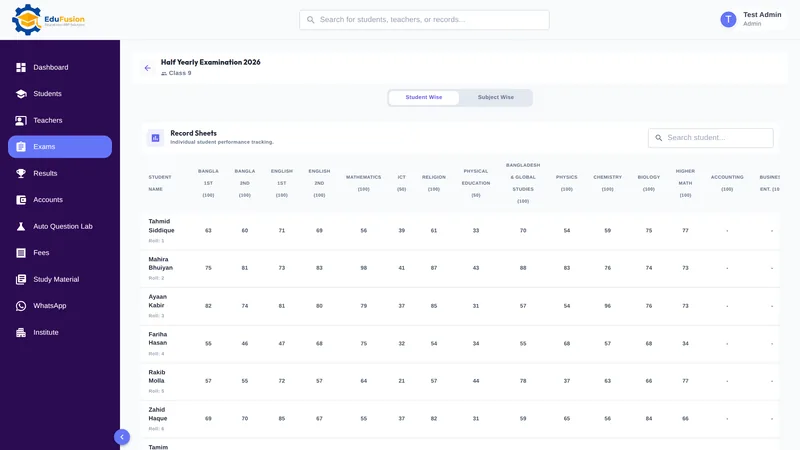
Only the admin publishes results, and once they're published, teachers can only view those marks. The admin sees every teacher-made question paper with the teacher's name, sees which classes' attendance was taken and by whom, and can still enter marks and attendance for any class.
How it works
- Assign each teacher the classes and subjects they teach.
- On the teacher's page, open Portal access, type a first password and share it with the teacher; their email is the login.
- The teacher signs in from their phone's browser and sees only their own classes and subjects.
- Each school day, the teacher takes today's attendance for their classes from the Attendance tab.
- After an exam, the teacher opens Marks, picks the exam subject, enters each student's marks and saves.
- The admin checks the marks and publishes the results; from then on the marks are view only.
Why EduFusion for teachers
Made for the phone teachers already carry
The portal opens in the phone's browser with the menu along the bottom, so there's no separate teacher app or marks entry app to install. It works on a computer too.
Connected to exams, results and attendance
Saved marks go straight into the exam, with grades and GPA from your grading rules. Attendance shows on the admin's dashboard and in each student's portal, and absence alerts reach guardians if the school turns them on.
Each teacher sees only their own work
No fees, salaries, accounts or student list, and no other teacher's classes. Passwords are stored hashed, never in plain text, and the admin can turn any login off.
Question papers from NCTB chapters
Teachers draft Bangla or English papers for their own subjects automatically, from NCTB chapters for Classes 4–12, with up to 150 MCQs, or 50 MCQs and 15 creative questions, per paper.
Teacher logins included
Every plan includes every feature, teacher logins too: ৳2,499 a month for up to 200 students or ৳3,999 for up to 1,000, with no charge per teacher. Larger schools can ask for a Custom plan.
Try it free for 30 days
Give a few teachers a login and let them take attendance and enter one exam's marks before you pay anything. During the trial, the Auto Question Lab saves up to 5 question papers in all.
Teachers' marks and attendance: EduFusion vs paper vs Excel
Paper mark sheets work, and a shared Excel file or Google Sheet is a real step up when only a few teachers use it. Here is how the options compare when every teacher enters their own marks and attendance.
| What you need | Paper mark sheets and registers | Excel or Google Sheets | Separate tools | EduFusion |
|---|---|---|---|---|
| Marks reach the result | Typed again by the office | Copied from each teacher's sheet | Exported and combined | Saved straight into the exam |
| Entering marks on a phone | Written by hand | Possible, but fiddly on a small screen | Depends on the tool | One card per student, with the number keypad |
| Each teacher sees only their own classes | Each keeps their own sheet | Only with a separate file for each teacher | Depends on the tool | Yes, set by the admin |
| Marks locked after results | Corrections in pen | Anyone with the file can edit | Depends on the tool | View only once results are published |
| Today's attendance | The class register | A sheet for each class, kept by hand | A separate attendance app | Taken on the phone, seen by the office |
| Guardians of absent students told | A phone call from the office | Calls or messages by hand | Depends on the tool | SMS or WhatsApp alerts, if the school turns them on |
How other school software in Bangladesh handles teacher logins
Of the 10 school management products we checked on 19 October 2026, 8 list teacher logins on their websites, so teacher logins alone don't set EduFusion apart. Automatic question papers do: none of the 9 Bangladesh-built products lists automatic question generation. Some list things EduFusion doesn't have, such as a native mobile app. The table shows four of the products we checked. "Not listed" means we didn't find it there, not that the product can't do it.
| Listed on the website | School360 | Eduman | Witty EMS | ClassMate | EduFusion |
|---|---|---|---|---|---|
| Teacher logins | Listed | Listed | Listed | Listed | Yes |
| Teachers enter marks | Not listed | Listed | Listed | Listed | Yes, on the phone |
| Teachers take attendance | Not listed | Listed | Not listed | Not listed | Yes, on the phone |
| Question papers | Not listed | Not listed | Not listed | Listed (question bank) | Yes, drafted automatically from NCTB chapters |
| Native mobile app | Listed (Android student app) | Not listed (beta announced) | Listed (Android) | Not listed | No: opens in the phone's browser |
| Free trial advertised | Not listed | Not listed | Not listed | 14 days | 30 days |
Checked on 19 October 2026; features change, so check each vendor's site.
Who it's for
Any school, college or coaching centre in Bangladesh where subject teachers write marks and take attendance, and the office wants that work in the software without typing it twice.
- Subject teachers, who take attendance and enter their own marks on their phone, between classes.
- The office, which no longer types every mark sheet again after an exam.
- The principal or admin, who decides who gets a login, sees which classes' attendance was taken and by whom, and publishes the results.