
On this page
The problem: notes scattered across groups and photocopies
Many schools and coaching centres in Bangladesh share lecture sheets through Facebook groups, WhatsApp groups or the photocopy shop. Notes reach people who aren't your students, and the students who need them can't find last month's file.
Open groups leak your notes
A lecture sheet posted in a group can be forwarded anywhere, including to the students of the coaching centre down the road.
Files get buried in chats
Last month's chapter notes sit above hundreds of messages, and students keep asking for them again.
Photocopies cost money
Printing a sheet for every student, for every chapter, adds up, and absent students miss out.
The wrong notes for the wrong class
In a shared group, Class 9 and Class 10 notes get mixed, and students open files meant for someone else.
How EduFusion solves it
EduFusion keeps your notes inside your institute. You upload each PDF to a class, and EduFusion shows it only to that class's students in their portal, with no public link to forward.
Before
Lecture sheets in open Facebook and WhatsApp groups, photocopies for every chapter and notes that anyone can forward.
With EduFusion
PDF notes uploaded once to a class. Only that class's signed-in students can preview and download them.
What's inside EduFusion's notes sharing platform
A simple, private place for class notes, lecture sheets and other PDF material.
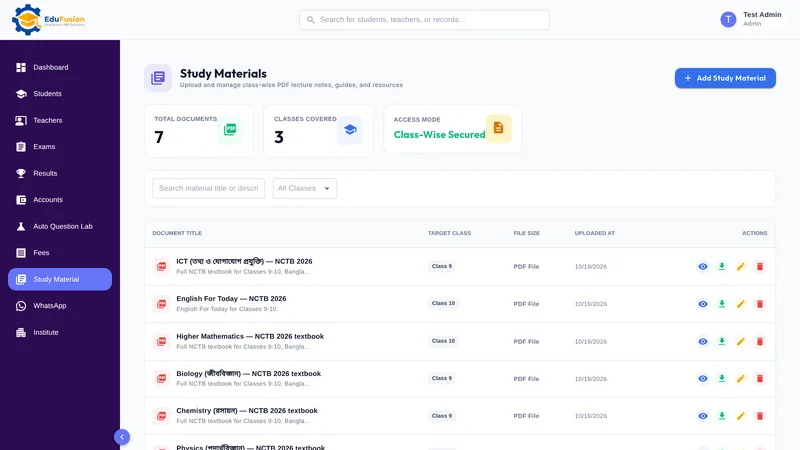
Share class-wise PDF notes with students
Choose the class, add a title and a short description, and upload the PDF. Each file is shared with one class.
Private lecture sheets only for your students
Files are never public links. Only signed-in members of your institute can open them, and a student sees only their own class's files.
Preview and download in the student portal
Students open Study Material in their portal to read a file on screen or download it to read later.
Titles and descriptions students understand
A clear title and description, such as the chapter and what the sheet covers, help students pick the right notes.
Study material on the student dashboard
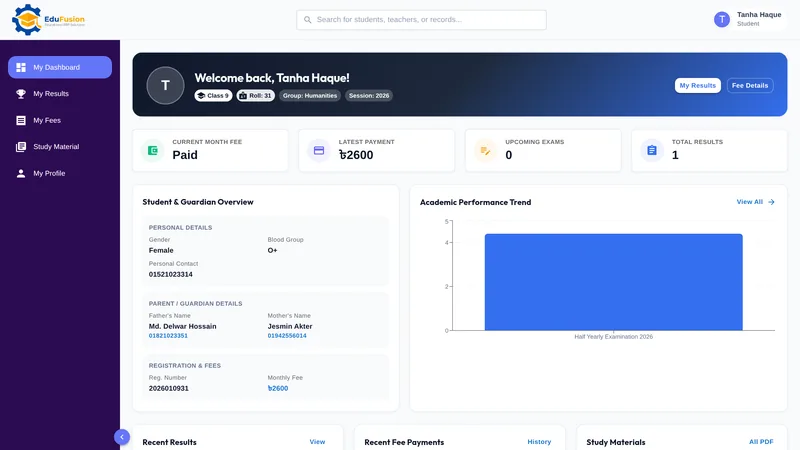
Study materials also appear on the student's portal dashboard, next to their recent results and this month's fee status.
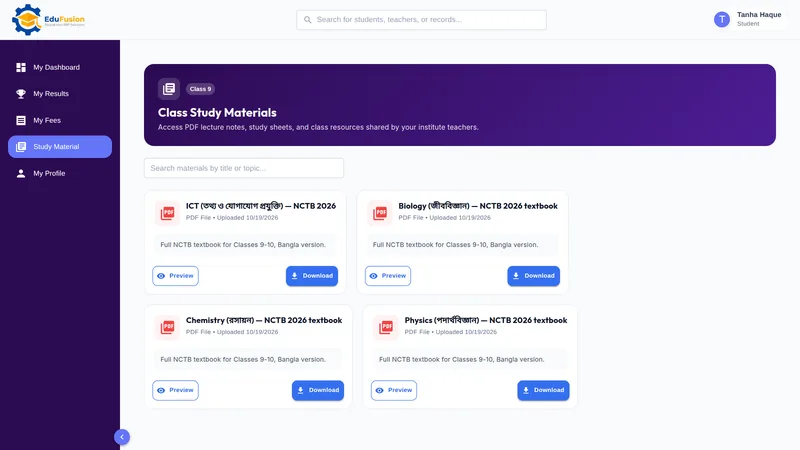
One login for notes, results and fees
Students use the same portal login for notes, results and fees, so there is no extra app or account to manage.
What it isn't: a full LMS
Study material shares PDF files. It has no courses, quizzes, homework or lesson plans, so it does not replace a full learning management system (LMS).
How it works
- Open Study Material and choose the class the notes are for.
- Add a title and a description, and upload the PDF.
- EduFusion makes the file visible only to that class's signed-in students.
- Students open Study Material in their portal to preview or download it.
Why EduFusion for sharing notes
Private by default
No public links: only your institute's signed-in members can open a file, and students see only their own class's files.
Made for schools and coaching centres
Class-wise notes and lecture sheets, the way Bangladeshi schools and coaching centres already hand them out.
Same login as results and fees
Students find notes in the same portal where they see their results and fee history.
Works on any phone
The student portal runs in the browser and installs on a phone like an app, with nothing to download from an app store.
Clear price, every feature
From ৳2,499 a month for up to 200 students, with study material, results, fees and everything else included.
Try it with one class
Use it free for 30 days. Upload one chapter's notes for a class and ask a student to open them.
Sharing notes: EduFusion vs groups vs photocopies
Google Drive and messaging groups are free and quick, and for a one-off file they work fine. Here is how the options compare when you share notes with many classes all year.
| What you need | Photocopies | Google Drive links | Facebook or WhatsApp groups | EduFusion |
|---|---|---|---|---|
| Only your own students can open the notes | Anyone with a copy | Anyone with the link, unless restricted | Anyone the file is forwarded to | Only signed-in members of your institute |
| Each class sees only its own files | Handed out by class | A folder per class to manage | A group per class to manage | Yes, by the class you choose |
| Finding last month's notes | Kept by each student | Search the folder | Scroll back through chats | On the Study Material page |
| Cost per sheet | Printing for every student | Free | Free | Included in your plan |
| Linked to the student's results and fees | No | No | No | Yes, the same student portal |
| Courses, quizzes and homework (a full LMS) | No | No | No | No, PDF sharing only |
| File types | Paper | Any file | Most files | PDF only |
Who it's for
Schools, colleges and coaching centres in Bangladesh that hand out notes, lecture sheets or chapter summaries as PDF and want them to stay with their own students.
- Coaching centres, whose lecture sheets are their own work and shouldn't travel beyond enrolled students.
- Schools, which share class notes, syllabuses and model tests class by class.
- Students, who find every note for their class in one place on their phone.