
On this page
The problem: a salary sheet rebuilt by hand every month
Many schools in Bangladesh keep teacher salaries in a register or an Excel sheet that is copied and edited each month. Part payments, advances and proof of payment are tracked somewhere else, so the month's picture is never in one place.
The sheet is copied every month
Last month's file is duplicated, names and amounts are fixed by hand, and one broken formula changes the total.
Part payments are easy to forget
When a salary is paid in two instalments, the second half often lives only in someone's memory or a note in the margin.
Proof of payment is written by hand
When a teacher asks for a record of what they were paid, someone writes a voucher or types it again from the register.
Payroll and expenses don't match
Salaries paid from the cash box go into the salary register but not always into the expense book, so the month's spending looks smaller than it was.
How EduFusion solves it
EduFusion keeps each teacher's monthly salary on their profile and records every salary payment against a teacher and a month. The same payment appears in the Accounts ledger, on its printed voucher and in the dashboard's payroll chart, so the figures agree.
Before
An Excel sheet copied every month, a register for part payments and vouchers written one at a time.
With EduFusion
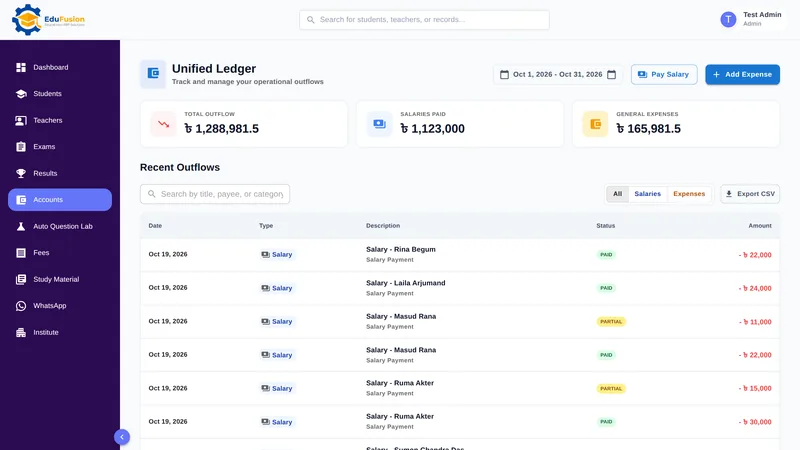
Pay each teacher from Accounts. The ledger lists every salary payment, exports to Excel and prints a voucher for any payment.
What's inside EduFusion's teacher salary sheet
Everything the office needs to pay teachers each month and keep a record of it.
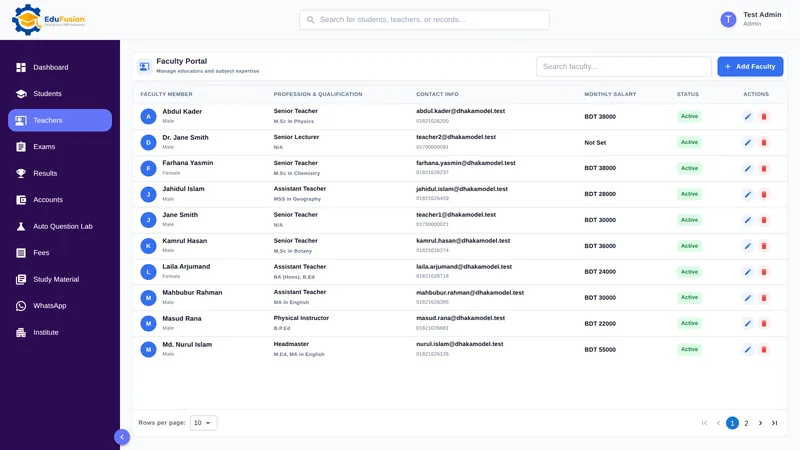
Teacher profiles with monthly salary
Each teacher has a profile with designation, department, joining date, qualification, subjects taught, contact details, status and monthly salary. The teacher list shows every teacher's monthly salary.
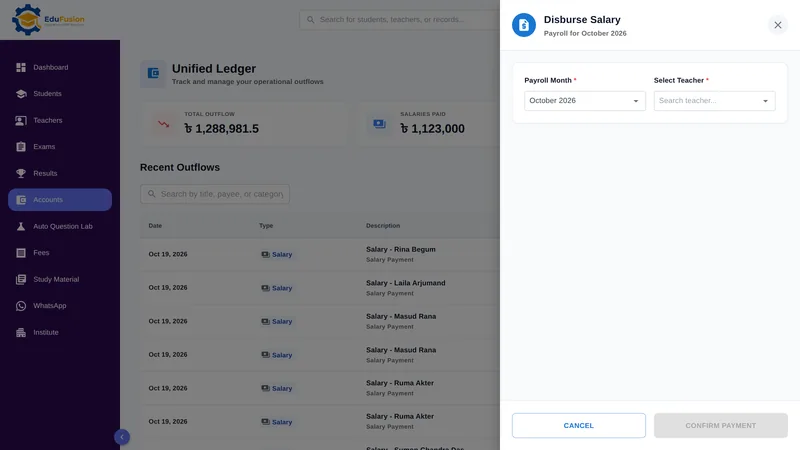
Pay Salary, in full or in part
In Accounts, choose Pay Salary, a teacher and a month: this month or any of the 11 before it. The amount starts at the monthly salary, or at what is still due after a part payment. The record is Paid or Partial, and any remainder stays on it as a due.
Salary with allowances and deductions
When you record a payment, add allowances, for example a festival bonus, or deductions, for example an advance being repaid, each with its own name.
The month's salary payments in one list
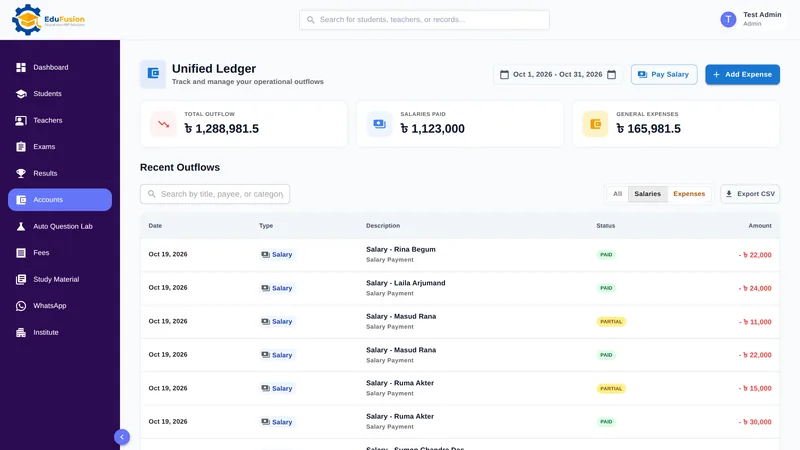
Every salary payment joins the Accounts ledger. Filter it to Salaries and a date range, such as one month, to see each payment with the teacher, date, amount and status.
Teacher salary sheet in Excel
Use Export CSV to open the filtered list in Excel. Add a signature column, sort it or print it in the salary sheet format your school already uses.
A printable voucher for each payment
Open any salary payment's details in the ledger and choose Print Receipt / Voucher. Give the printout to the teacher or keep it in the voucher file.
This month's payroll on the dashboard
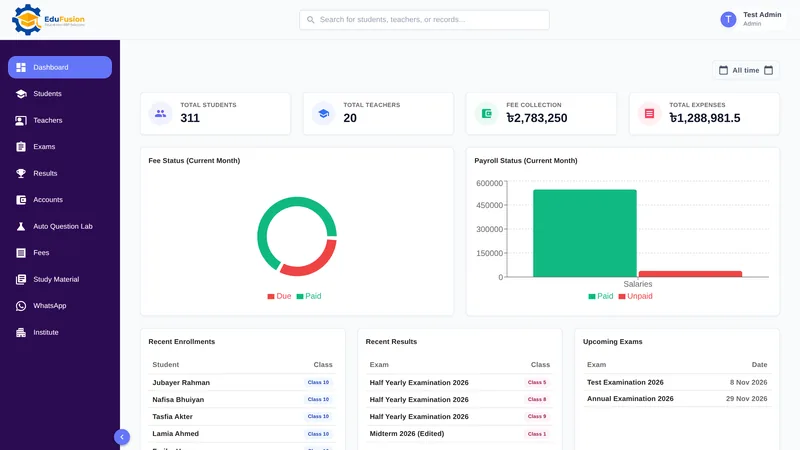
The dashboard shows this month's payroll status as paid and unpaid, so the head can see at a glance whether any salaries are still to be paid.
How it works
- Add each teacher once with their designation, joining date and monthly salary.
- In Accounts, choose Pay Salary, then pick the teacher and the month.
- Check the amount, add any allowances or deductions, and pay in full or in part.
- Print the payment's receipt or voucher if the teacher needs a paper record.
- For the month's salary sheet, filter the ledger to Salaries and the month's dates, then export it as CSV.
- Check this month's paid and unpaid salaries on the dashboard.
Why EduFusion for teacher salaries
Made for how schools here pay
Monthly salaries in taka, part payments when fee collection is slow, and allowances and deductions on the same payment.
Connected to your accounts
Each salary payment goes into the Accounts ledger and the dashboard, so nobody copies salaries into the expense book.
Excel when you want it
Export CSV gives you the salary payments for any date range as a file that opens in Excel, for your own format or for your accountant.
Works on any device
Pay salaries at the office on a computer or on a phone, with nothing to install.
Clear price, every feature
From ৳2,499 a month for up to 200 students. Payroll, accounts, fees, results and everything else are included.
Try it on your own data
Use it free for 30 days. Add your teachers and pay one month's salaries before you pay anything.
Teacher salaries: EduFusion vs Excel vs a register
A salary sheet in Excel works, and for a few teachers it may be all you need. The trouble starts with part payments, proof of payment and copying totals into the expense records. Here is how the options compare.
| What you need | Salary register | Excel or Google Sheets | Separate tools | EduFusion |
|---|---|---|---|---|
| Every salary paid in a month | A page in the register | A new sheet each month | Depends on the tool | Ledger filtered to Salaries |
| Part payments and the remainder | Easy to lose track | Possible with careful formulas | Often not tracked | Paid or Partial, due carried |
| Allowances and deductions | Written in the margin | Extra columns and formulas | Depends on the tool | Named on the payment |
| Proof of payment for the teacher | A signature in the register | Made in Word or another sheet | A separate payroll app | Printed receipt or voucher |
| Salaries in the expense records | Copied into the cash book | Copied to another sheet | Export and combine | Added to the Accounts ledger |
| The month's salaries in Excel | Typed in again | Already in Excel | Export, if the tool allows | Export CSV |
| This month's paid and unpaid at a glance | Count the ticks | A status column you update | Depends on the tool | Payroll chart on the dashboard |
| Teachers check their own salary | No | Only if you send it | Some tools have a teacher login | Not yet: the office prints the voucher |
Who it's for
Any school, college or coaching centre in Bangladesh that pays its teachers a monthly salary from the office and wants simple school payroll software, whether it has five teachers or fifty.
- The accounts desk, which pays salaries and prints vouchers each month.
- The principal or owner, who checks this month's paid and unpaid salaries on the dashboard.
- The accountant or managing committee, who get the month's salary payments as a CSV file.
- Teachers, who get a printed voucher from the office for each payment.