
On this page
The problem: the school's structure lives in too many places
In many schools, the list of classes, groups, subject codes and fees sits in a register, on a notice board and in a few Excel files. When a grading rule or a fee changes, someone has to remember every place to update.
Groups and subjects get mixed up
Science, Commerce and Humanities students take different subjects, and a wrong list means wrong mark sheets.
Grade tables with mistakes
A typed grade table can put the same mark in two grades, and nobody spots it until results day.
Deleting the wrong thing
Removing a class or a subject from a spreadsheet can quietly break the records that depended on it.
Sessions without clear dates
When nobody records where a session starts and ends, students and fees from two years get mixed.
How EduFusion solves it
EduFusion keeps your school's academic structure in one place: sessions, classes, groups, subjects and grading rules. You set it up once in a short wizard, and EduFusion checks each change so common mistakes are stopped before they reach your records.
Before
Classes in a register, subject codes on a notice, a grade table in Word and fees in an Excel file, each updated separately.
With EduFusion
One setup for sessions, classes, groups, subjects and grading, used by fees, exams and results, with checks on every change.
What's inside EduFusion's school academic management system
Everything that describes how your school is organised, set once and used across EduFusion.
A 3-step setup wizard
Right after sign-up, the wizard asks for your branding (institution name, logo and contact details), your grading rules and your structure (classes and subjects).
Academic session management
Create academic sessions with a start date and an end date. EduFusion refuses an end date that isn't after the start, and each student is linked to their session.
Classes with fees and groups
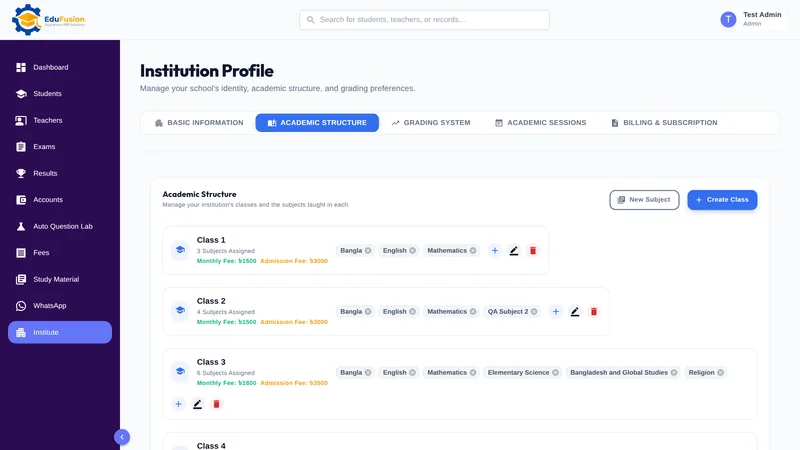
Each class has its own monthly fee and admission fee, and can have Science, Commerce and Humanities groups. Our school fee management software uses these amounts.
Subjects with codes and groups
Add each subject with a name, a code and a group, so a Science student's subjects are kept apart from a Humanities student's.
Religion as separate subjects
Islam, Hindu, Christian and Buddhist religion and moral education are set up as separate subjects, and each student is graded only in the religion subject they sat.
Custom grading system for schools
Write your own grade table: each grade gets a grade point from 0 to 5 and a mark range from 0 to 100. EduFusion refuses overlapping ranges and a minimum above a maximum, and you can change the rules later in settings. The school result software uses them for every grade and GPA.
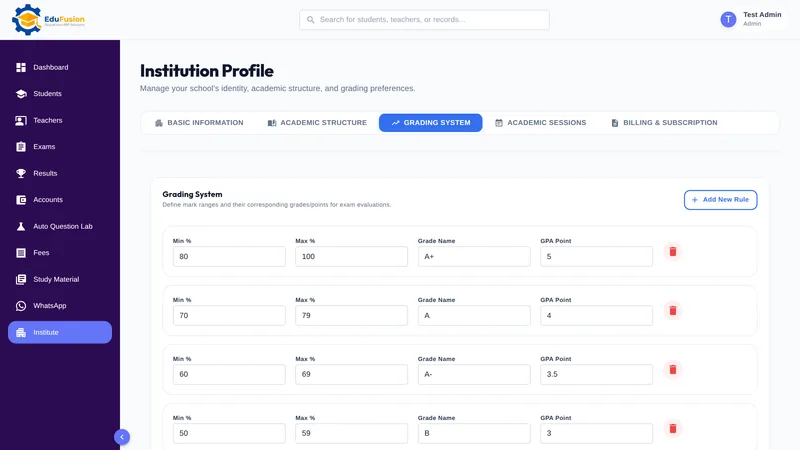
Safety checks that protect your records
A class that has students can't be deleted, and neither can a subject that already has marks. Duplicate class names and negative fees are refused.
How it works
- Sign up and add your institution's name, logo and contact details.
- Set your grading rules: each grade, its grade point and its mark range.
- Add your classes and subjects, with groups and subject codes.
- Create the academic session with its start and end dates, and set each class's monthly and admission fee.
- Import or add your students; fees, exams and results now work from this setup.
Why EduFusion for academic setup
Made for Bangladeshi schools
Science, Commerce and Humanities groups, separate religion subjects and grade points up to 5, the way schools here already work.
Mistakes are stopped early
Overlapping grade ranges, duplicate class names and negative fees are refused, and classes or subjects in use can't be deleted.
One setup for every module
Fees use each class's fees, exams use its subjects and results use your grading rules, all from the same setup.
Your rules, not ours
The grade table is yours to write, and you can change it later in settings.
Clear price, every feature
From ৳2,499 a month for up to 200 students, with academic setup, results, fees and everything else included.
Set up your school for free
Use it free for 30 days. Run the setup wizard with your real classes before you pay anything.
Academic setup: EduFusion vs Excel vs a register
A well-kept Excel workbook can hold your classes and subjects, and many schools manage that way. Here is how the options compare when the same setup has to drive fees, exams and results.
| What you need | Register and notice board | Excel or Google Sheets | Separate tools | EduFusion |
|---|---|---|---|---|
| Sessions with start and end dates | Written at the top of a page | A row or a sheet | Set in each tool | Checked: the end comes after the start |
| Classes with monthly and admission fees | A fee chart on the wall | A fee sheet | Typed again in the fee tool | On each class, used by fees |
| Science, Commerce and Humanities groups | Separate lists | A column or a tab | Depends on the tool | Groups on classes and subjects |
| Subject codes | Noted in the register | A column | Typed again in each tool | Stored with each subject |
| Grade table checked for overlaps | No | Only if you build a check | Depends on the tool | Yes, overlaps are refused |
| Protection from deleting data in use | No | No | Rarely | Classes with students and subjects with marks can't be deleted |
| Religion subjects | Noted per student | A column per religion | Depends on the tool | Separate subjects, graded only when sat |
Who it's for
Schools, colleges and coaching centres in Bangladesh setting up EduFusion for the first time, or starting a new academic session.
- The institute admin, who runs the setup wizard and keeps classes, subjects and fees up to date.
- The principal, who decides the grading rules and wants them applied the same way in every class.
- Schools with groups, where Science, Commerce and Humanities students take different subjects.