
On this page
The problem: nobody can say where last month's money went
In many schools in Bangladesh, spending is written in a cash book, vouchers sit in a file, and teacher salaries live in a separate register. When the principal or the managing committee asks what was spent last month, someone has to add it all up by hand.
Vouchers end up in a drawer
A bill paid in cash is easy to record and just as easy to lose. Months later, nobody remembers what the ৳3,500 was for.
No categories, no answers
Without a category on each expense, "How much did we spend on repairs this year?" means reading every line of the cash book.
Salaries sit in another register
Teacher salaries are kept apart from every other expense, so the month's total has to be put together by hand.
Month-end reports take days
Copying the cash book into Excel before the committee meeting is slow, and one missed line changes the total.
How EduFusion solves it
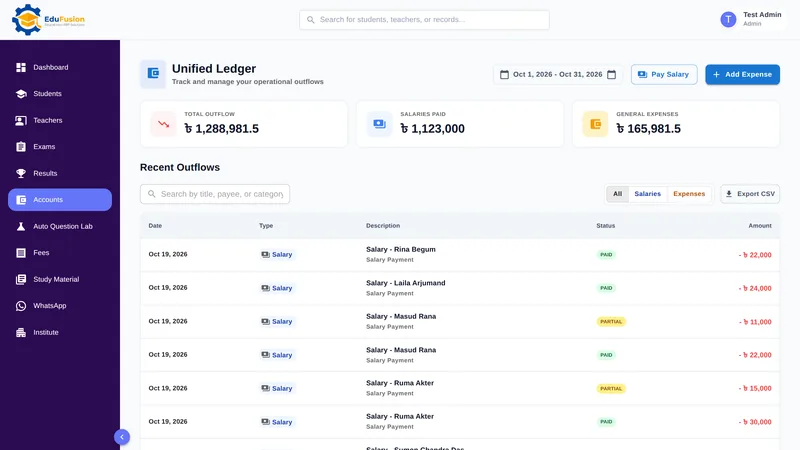
EduFusion keeps one ledger of everything the school pays out. Each expense is recorded once with its category and date, and each salary payment you make in payroll joins the same list, so the totals are always up to date.
Before
A cash book, a file of vouchers and a salary register, added up by hand before every committee meeting.
With EduFusion
One ledger of salaries and expenses with totals at the top, a date range for any period and a CSV export for your accountant.
What's inside EduFusion's school accounting software
Everything the office needs to record what the school spends and show it clearly to the principal, the committee and your accountant.
A ledger of everything you pay out
The Unified Ledger lists every salary payment and every expense, with total outflow, salaries paid and general expenses shown at the top.
Track school expenses by category
Give each expense a title, amount, category, date and description. Choose Utilities, Maintenance, Supplies or Events, or pick Other and type your own name for it.
Teacher salaries added automatically
When you pay a salary in salary management, the payment appears in the ledger. Nobody copies it across from a register.
Filters, search and a date range
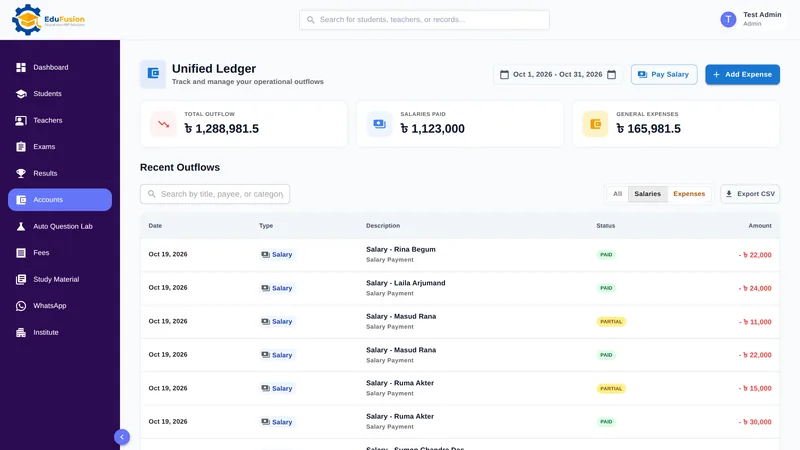
Show All, only Salaries or only Expenses. Search for any entry, and set a date range to see one month, one term or the whole year.
Transaction details and CSV export
Open any entry to see its details. Use Export CSV to open the ledger in Excel or share it with your accountant.
School income and expenses on the dashboard
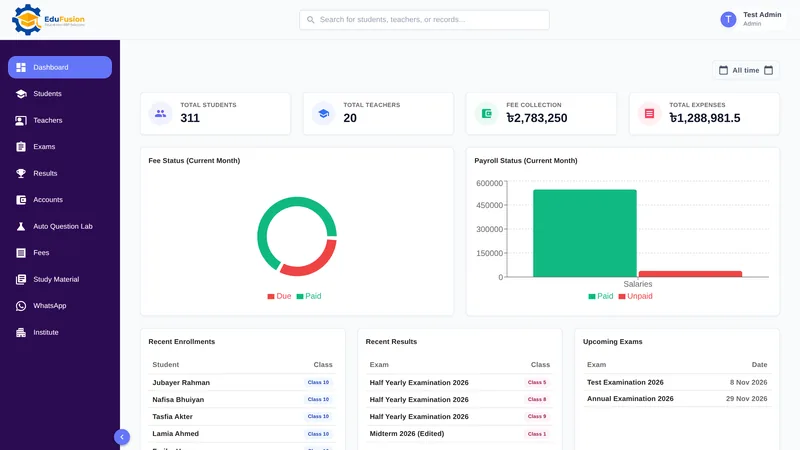
The ledger lists only money going out. Fee collection shows on the dashboard, next to total expenses and this month's payroll status, with a date range picker.
How it works
- Record each expense as you pay it: title, amount, category, date and a short description.
- Pay teacher salaries in salary management; each payment is added to the ledger.
- Open the ledger and set the date range, for example the first to the last day of the month.
- Filter to Salaries or Expenses, or search for a single entry.
- Export the ledger as CSV for your accountant or the managing committee.
- Compare fee collection with total expenses on the dashboard.
Why EduFusion for school accounts
Categories that fit a school
Utilities, maintenance, supplies and events in taka, plus Other under any name you need.
Connected to payroll and fees
Salaries come straight from salary management, and fee collection sits next to total expenses on the dashboard.
Works with your accountant
EduFusion keeps clear records and exports them as CSV. Your accountant still keeps the books and prepares the returns.
Works on any device
Record an expense at the desk on a computer or on a phone, with nothing to install.
Clear price, every feature
From ৳2,499 a month for up to 200 students, with accounts, payroll, fees, results and everything else included.
Try it on your own data
Use it free for 30 days. Record a month of expenses and salaries before you pay anything.
School accounts: EduFusion vs Excel vs a cash book
Excel is a good tool for a simple expense list, and many school offices keep their accounts in it today. Here is how the options compare for recording what the school spends.
| What you need | Cash book and vouchers | Excel or Google Sheets | Separate tools | EduFusion |
|---|---|---|---|---|
| Record an expense with its category | A line in the cash book | A row with a category column | Depends on the tool | Title, amount, category, date and note |
| Teacher salaries in the same list | A separate salary register | Copied in by hand | Usually a separate payroll tool | Added when you pay |
| Totals for a month | Added up by hand | Easy with SUM, if every row is in | Export and combine | At the top of the ledger, with a date range |
| Find one payment | Turn the pages | Search and filters work well | Search each tool | Search, filters and a date range |
| Fee income beside spending | A separate fee register | Another sheet or file | Different tools | Both on the dashboard |
| Share with your accountant | Photocopy the pages | Share the file | Export from each tool | Export CSV |
| Double-entry books and tax returns | Done by an accountant | Done by an accountant | Accounting software | Not included: your accountant does it |
Who it's for
Any school, college or coaching centre in Bangladesh that pays its own bills and salaries from the office and wants a clear record of where the money goes.
- The accounts desk, which records bills and salary payments every day.
- The principal or owner, who wants this month's spending and fee collection without waiting for a report.
- The managing committee, which asks for spending by category before each meeting.
- Your accountant, who gets a clean CSV file instead of photocopied pages.