
On this page
The problem: results that depend on one person's formulas
In many schools, results are made in an Excel file that one teacher built years ago, or worked out by hand in a result register. Every exam, the same rules have to be applied again, and small mistakes reach the report cards.
Formulas break quietly
One pasted row or a changed cell reference, and a whole column of GPAs is wrong before anyone notices.
The one-F rule gets missed
If a formula only averages the points, a student with an F in one subject can still show a good GPA.
Four religion subjects, one sheet
Students sit Islam, Hindu, Christian or Buddhist religion, and the empty cells in the other columns upset the averages.
Merit positions cause arguments
When two students have the same GPA, sorting by GPA alone can't say who comes first.
How EduFusion solves it
EduFusion applies the same rules every time. You set your grading rules once, enter the marks, and every grade, GPA, pass rate and merit position is worked out the same way for every class.
Before
A result register, or an Excel file with formulas only one person understands, checked by hand before every result.
With EduFusion
Grading rules set once. Grades and GPA worked out as marks are saved, and a merit list ordered by GPA, then total marks.
What's inside EduFusion's school result software
From the grading table to the result each student sees.
Grading rules you set
Each institute sets its own grades: the grade, its grade point from 0 to 5, and the mark range. EduFusion refuses overlapping ranges and a minimum above a maximum. Set them in the setup wizard and change them later in settings.
Automatic GPA calculation on the 5.00 scale
Each subject's grade comes from the percentage of its total marks. GPA is the average of the grade points, and one F makes the overall result F with GPA 0.00, the board rule.
Religion graded in the subject the student sat
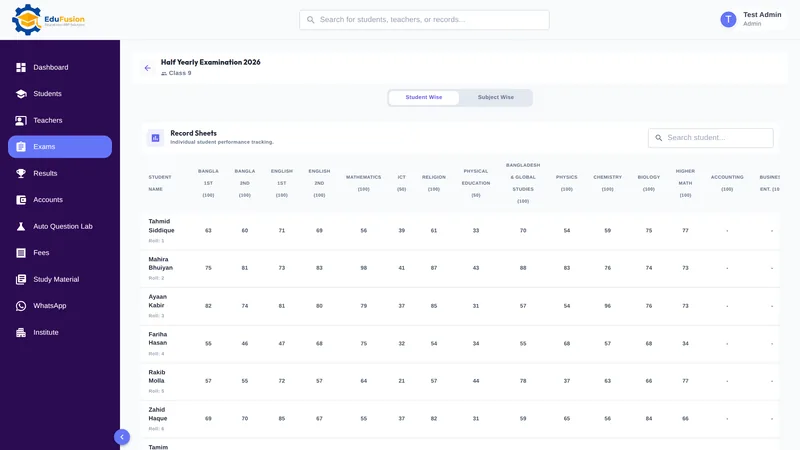
Religion is set up as separate subjects: Islam, Hindu, Christian and Buddhist religion and moral education. Each student is graded only in the one they sat, so the others never count against them.
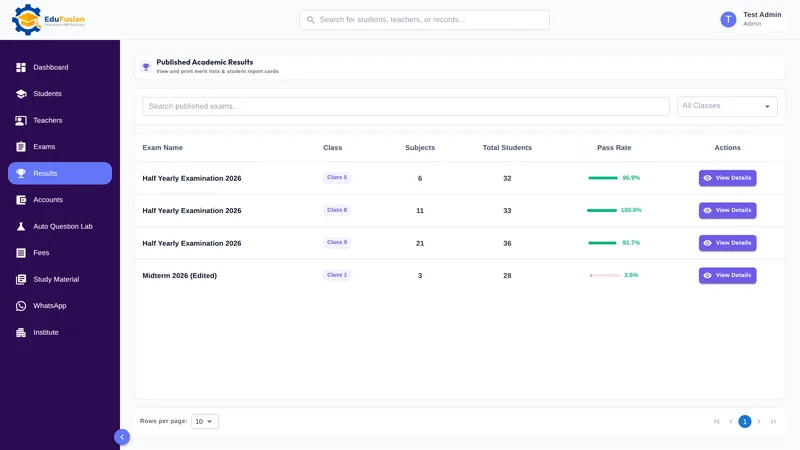
Class-wise result sheet
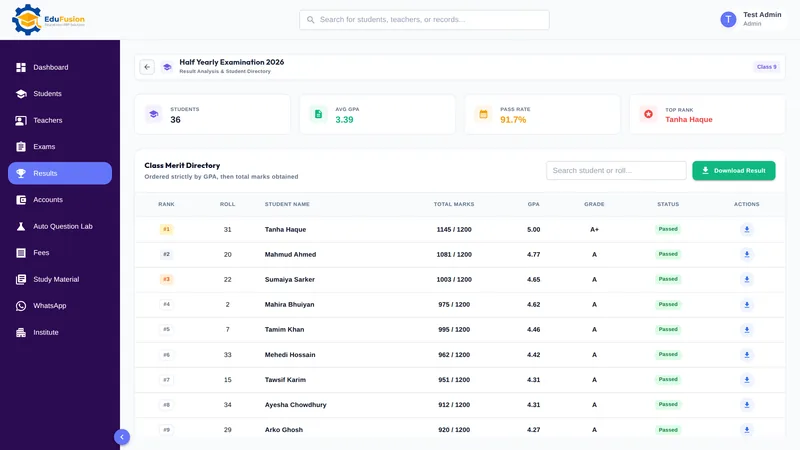
For each exam, see the whole class at a glance: the number of students, the average GPA, the pass rate and the top rank.
Merit list ordered by GPA, then total marks
The merit list puts students in order of GPA and breaks ties by total marks. Download it as a PDF with Download Result.
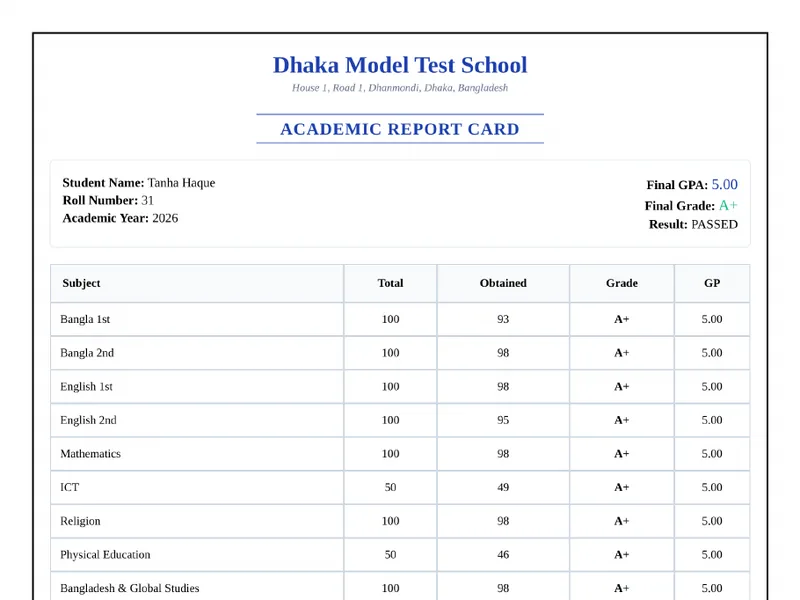
Report cards for every student
Download each student's report card as a PDF with your institute's logo and name, one student at a time. The report card generator guide shows what's on it. When you publish, each family also gets their child's result on WhatsApp: see exam results on WhatsApp.
Publish exam results online for students
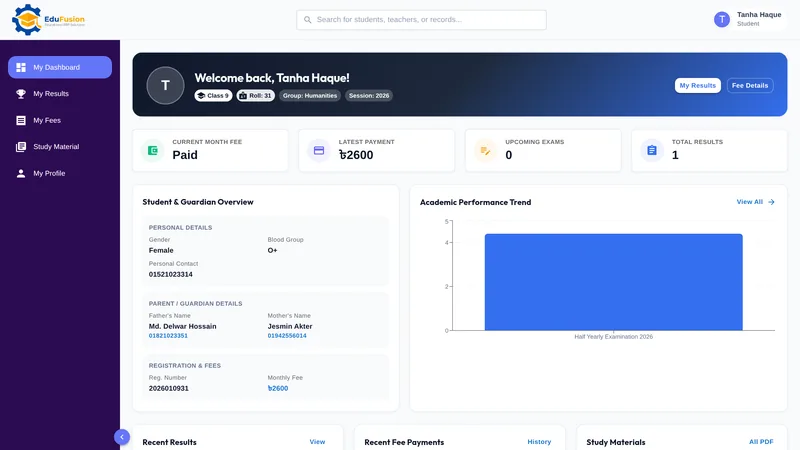
When you publish, students see their subject marks, grades and GPA in the student portal and get a push notification.
How it works
- Set your grading rules in the setup wizard, or change them later in settings.
- Enter each subject's marks for the exam in marks entry.
- EduFusion works out each subject's grade and every student's GPA as the marks are saved.
- Open the class result to check the average GPA, pass rate, top rank and merit list.
- Download the merit list PDF and each student's report card PDF.
- Publish the results; students see them in the portal and get a push notification.
Why EduFusion for school results
The board's rules, built in
Grade points on the 5.00 scale, one F means GPA 0.00, and religion graded only in the subject the student sat.
Your grading table, not ours
Set your own grades, points and mark ranges. EduFusion checks them for overlaps before it uses them.
From marks to report card in one place
The marks from exam entry become the class result, the merit list, the report cards and each student's portal page.
Students know when results are out
Publishing sends a push notification, and each student sees only their own result.
Clear price, every feature
From ৳2,499 a month for up to 200 students, with results, report cards, fees and the Question Lab included.
Try it on your last exam
Use it free for 30 days. Enter one exam's marks and compare the result with the one you made by hand.
School results: EduFusion vs Excel vs a result register
Excel is fine for one class's result if someone careful owns the formulas, and many schools rely on that person every year. Here is how the options compare.
| What you need | Result register | Excel or Google Sheets | Separate tools | EduFusion |
|---|---|---|---|---|
| Grade for each subject | Looked up in the grade table | Nested formulas | Depends on the tool | From your grading rules, as marks are saved |
| GPA | Added and divided by hand | A formula, if nobody breaks it | Depends on the tool | Average of grade points, automatic |
| One F means F, GPA 0.00 | Easy to miss | Needs an extra formula | Depends on the tool | Built in |
| Religion subjects | Separate columns, filled with care | Blank cells to work around | Depends on the tool | Graded only in the subject sat |
| Merit list and equal GPAs | Sorted by hand | Sort by GPA; ties need care | Depends on the tool | By GPA, then total marks |
| Report cards | Written one by one | Mail merge, if someone sets it up | A separate tool | PDF for each student |
| Students see their result | Notice board | A printed or shared file | Rarely | Student portal, with a push notification |
How other school software in Bangladesh handles results
We read what four well-known products publish on their own websites. "Not listed" means we didn't find it there, not that the product can't do it. Most list automatic GPA, so that alone doesn't set EduFusion apart, and teacher logins are one thing they list that EduFusion doesn't offer yet.
| Listed on the website | School360 | Eduman | Edufy | ClassMate | EduFusion |
|---|---|---|---|---|---|
| Exams, marks and results | Listed | Listed | Listed | Listed | Yes |
| Automatic GPA or grade calculation | Not listed | Listed | Listed | Listed | Yes, from your grading rules |
| Report card or marksheet | Listed | Listed | Listed | Listed | Yes, PDF for each student |
| Class merit list or merit position | Not listed | Not listed | Not listed | Listed | Yes, by GPA, then total marks |
| Teacher logins | Listed | Listed | Listed | Listed | Not yet; the admin enters marks |
| Push notifications | Not listed | Not listed | Listed | Not listed | Yes, when results are published |
| Free trial advertised | Not listed | Not listed | Not listed | 14 days | 30 days |
Checked on 19 October 2026; features change, so check each vendor's site.
Who it's for
Any school, college or coaching centre in Bangladesh that makes its own exam results with grades and GPA, from class tests to the annual exam.
- The exam committee, which prepares the results after every exam.
- The principal, who checks the pass rate and merit list before results go out.
- Students and their families, who see the result in the student portal as soon as it's published.