
On this page
- The problem: important notices miss the families without WhatsApp
- How EduFusion solves it
- What's inside EduFusion's bulk SMS for schools
- How it works
- Why EduFusion for school SMS
- SMS to parents: EduFusion vs a phone's SMS app vs a separate SMS panel
- Who it's for
- Frequently asked questions about bulk SMS for schools
The problem: important notices miss the families without WhatsApp
Many schools in Bangladesh send notices on WhatsApp, but some guardians use a basic phone or have no mobile data. Schools that send SMS often do it from a separate bulk SMS panel, with a number list copied from Excel.
Not every phone has WhatsApp
A grandparent with a basic phone, or a father working away from home without mobile data, never sees a WhatsApp notice.
Number lists go out of date
A separate SMS panel needs the numbers exported from Excel and uploaded again, so new admissions are missing and students who left still get messages.
The cost is a guess
A Bangla SMS holds fewer characters, and a long message splits into several SMS, so the real cost often shows only after sending.
Nobody knows who got it
Without a report for each number, the office can't tell a switched-off phone from a wrong number, and a parent says the notice never came.
How EduFusion solves it
EduFusion sends SMS from the same place as your WhatsApp campaigns, to the numbers already in your student records. It shows the cost before you send and reports on every number afterwards.
Before
A number list copied from Excel into a separate SMS panel, a cost you find out later, and no report for each number.
With EduFusion
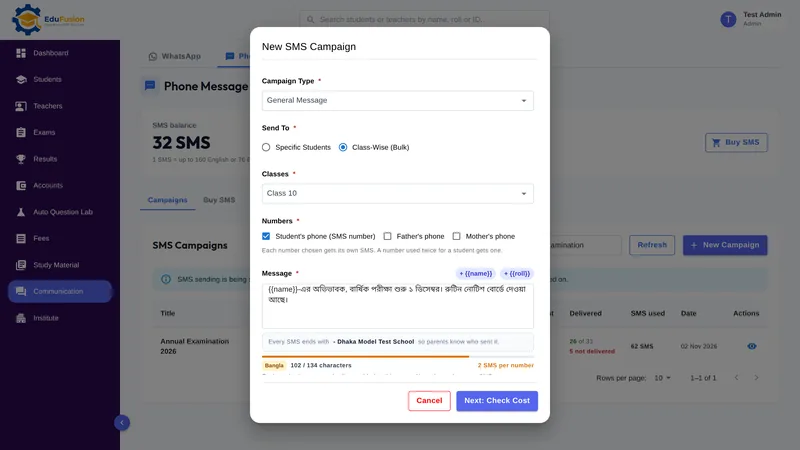
One campaign to a class from Communication → Phone Message. The cost check shows the SMS needed first, and each number shows whether the SMS was delivered.
What's inside EduFusion's bulk SMS for schools
Everything the office needs to send SMS to families from the student records it already keeps.
Bulk SMS to parents of one class or the whole school
Send to students you pick, or class-wise to one, several or all classes. Picking students suits a message only a few families need, such as a short note to the guardians of students who didn't come to school today.
The student's, father's or mother's number
Tick the numbers for each campaign: the student's phone (the SMS number in the student form, ticked by default), the father's and/or the mother's. Each number gets its own SMS, and a number entered twice for one student gets only one.
Each student's name and roll, and your institute's name
Add {{name}} or {{roll}} and every SMS carries that student's own name or roll. Every SMS ends with your institute's name, so parents know who sent it.
The SMS character limit, counted as you type
One SMS holds up to 160 English or 70 Bangla characters. A longer message uses more SMS, at 153 English or 67 Bangla characters each. The form counts the characters and the SMS for each number as you write.
A cost check before every campaign
Before anything is sent, EduFusion shows how many numbers, how many SMS, your balance after sending and the exact SMS one family gets. If the balance is too small, it stops there.
Bulk SMS price: packages from ৳40
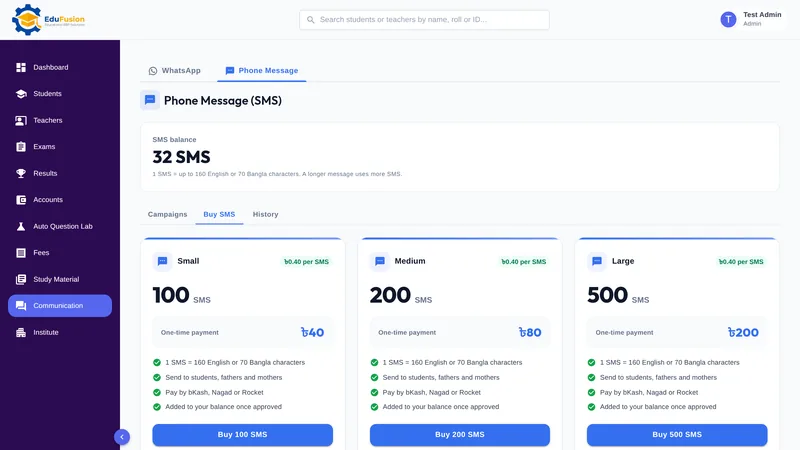
Buy 100 SMS for ৳40, 200 for ৳80 or 500 for ৳200 from EduFusion, ৳0.40 an SMS. Pay by bKash, Rocket or Nagad and enter the transaction ID; the SMS are added once EduFusion approves the payment. SMS aren't part of a plan's price.
A delivery report for every number
About 5 minutes after sending, each number shows Delivered or Not delivered, with the reason in plain words, such as a phone switched off. SMS that couldn't be sent, to a wrong number say, go back to your balance, and so do the unsent ones if you cancel a campaign while it sends. The history lists every SMS bought, spent and given back.
How it works
- Open Communication → Phone Message and buy a package in Buy SMS, paying by bKash, Rocket or Nagad.
- Enter the transaction ID; the SMS are added once EduFusion approves the payment.
- Click New Campaign, give it a title and a type, and pick students or classes.
- Tick the numbers to send to: the student's, the father's and/or the mother's.
- Write the message, add {{name}} if you like, and check the cost before you send.
- About 5 minutes later, open the campaign to see which numbers got the SMS.
Why EduFusion for school SMS
Reaches every phone
SMS arrive on any mobile phone, a basic one too, with no internet or WhatsApp needed.
WhatsApp and SMS side by side
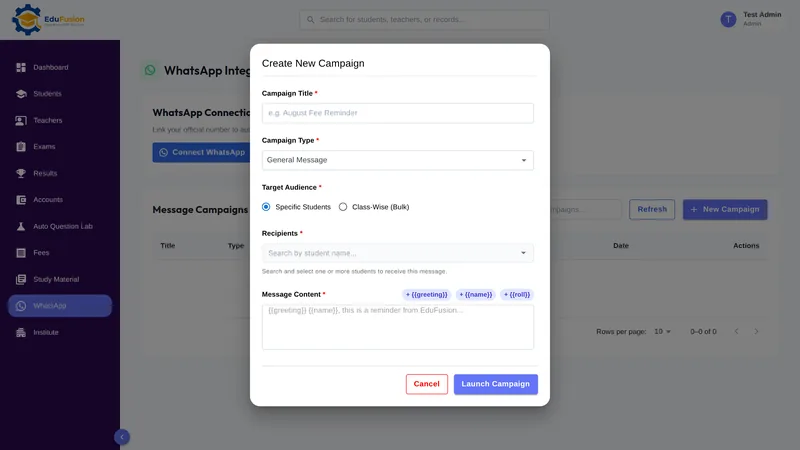
Communication has both. WhatsApp goes from your own number with no charge per message, and SMS reach the families without WhatsApp.
Numbers from your student records
Classes and numbers come from your current student list, so there's no number list to copy or upload again.
The cost before you send
The cost check shows the SMS needed and the balance after, and SMS that can't be sent go back to your balance.
Clear prices
SMS cost ৳0.40 each, in packages from ৳40. Plans start at ৳2,499 a month for up to 200 students, with every feature included.
Try it free for 30 days
Set up your classes and student numbers and send WhatsApp campaigns before you pay anything. SMS are bought separately, when you need them.
SMS to parents: EduFusion vs a phone's SMS app vs a separate SMS panel
For a message to a handful of families, a phone's own SMS app is fine. For a class or the whole school, here is how the options compare.
| What you need | Notice slips and phone calls | Excel list and a phone's SMS app | Separate bulk SMS panel | EduFusion |
|---|---|---|---|---|
| Reach every family in a class | A slip in the bag, or a call to each home | Number by number, from the list | Export the numbers and upload them | Pick the class and send |
| Right number: student, father or mother | Whoever answers or opens the bag | Whatever number is in the sheet | Whatever numbers you upload | Tick the student's, father's and/or mother's |
| Numbers kept up to date | The admission register | Only if someone updates the sheet | Only if you upload them again | From your current student records |
| Each student's name in the message | Written on each slip | Typed into each SMS | Depends on the panel | {{name}} and {{roll}} filled in |
| Know the cost before sending | Call charges add up | Depends on your SIM's package | Depends on the panel | Cost check: SMS needed and balance after |
| Know who received it | Only the calls answered | One message at a time | Depends on the panel | Delivered or Not delivered, with the reason |
| Parents can tell who sent it | The school's name on the slip | A staff member's number | Depends on the panel | Your institute's name ends every SMS |
How other school software in Bangladesh handles SMS
All 10 school management products we checked on 19 October 2026 list SMS notifications on their websites, so SMS alone doesn't set EduFusion apart; WhatsApp from your institute's own number, next to SMS, does. Some list SMS features EduFusion doesn't have, such as your own sender name (masking), voice SMS or results by SMS. The table shows four of the products we checked. "Not listed" means we didn't find it there, not that the product can't do it.
| Listed on the website | School360 | Eduman | ClassMate | OurCampusBD | EduFusion |
|---|---|---|---|---|---|
| SMS to guardians | Listed | Listed | Listed | Listed | Yes |
| SMS under the institute's own name (masking or branded) | Listed (masking) | Listed (own brand) | Not listed | Not listed | No: your institute's name ends every SMS |
| SMS price listed | Billed separately | ৳0.40, or ৳0.60 with own brand | Credit bought separately | Credit bought separately | ৳0.40 an SMS, packages from ৳40 |
| Results by SMS | Not listed | Listed | Not listed | Not listed | No: each result goes on WhatsApp |
| Voice SMS | Listed | Not listed | Not listed | Not listed | No |
| WhatsApp messaging to guardians | Not listed | Not listed | Not listed | Not listed | Yes, from your own number |
| Free trial advertised | Not listed | Not listed | 14 days | 14 days | 30 days |
Checked on 19 October 2026; prices change, so check each vendor's site.
Who it's for
Any school, college or coaching centre in Bangladesh whose notices, reminders and announcements must reach every family, including the families without WhatsApp.
- The office, which sends exam notices, holiday announcements, fee reminders and same-day notes to the guardians of students who didn't come in.
- The principal, who wants an important notice to reach every guardian's phone, with a report of who got it.
- Guardians with a basic phone or no mobile data, who still get every school notice as an SMS.