
On this page
- The problem: absences stay in the register, and guardians hear late
- How EduFusion solves it
- What's inside EduFusion's student attendance software
- How it works
- Why EduFusion for student attendance
- Student attendance: EduFusion vs Excel vs a paper register
- Who it's for
- Frequently asked questions about student attendance software
The problem: absences stay in the register, and guardians hear late
In most schools in Bangladesh, attendance is still a roll call and a tick in a paper register. The register shows who was absent, but the guardian often hears about it much later.
The register stays in the classroom
To know who is absent today, the office has to collect or check each class's register, one by one.
Guardians find out late
A guardian may learn that their child missed school only days later, from a teacher's call or at a parents' meeting.
Calling each family takes time
Phoning the guardians of every absent student is slow, so on a busy day the calls simply don't happen.
Month-end percentages by hand
Working out each student's attendance for the month means counting ticks across every page of the register.
How EduFusion solves it
EduFusion puts the register on the phones of the teachers who teach each class, with no machine to buy. A saved class shows on the office's Today screen, and guardians of absent students hear from the school at a time you choose.
Before
A paper register in every classroom, collected and counted by hand, and calls to a few families when someone has time.
With EduFusion
Each class's attendance saved from a teacher's phone. The office sees the whole day on one screen, and guardians of absent students get an SMS or WhatsApp message automatically.
What's inside EduFusion's student attendance software
Everything from the morning roll call to the month's register, for teachers, the office, guardians and students.
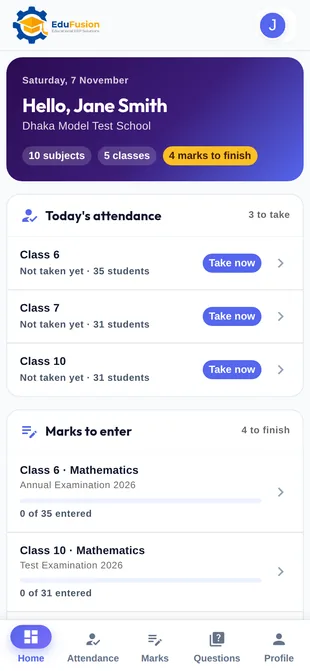
A student attendance app on the teacher's phone
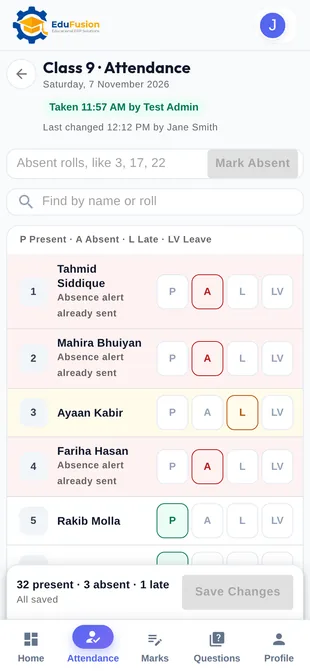
Any teacher who teaches a subject in a class can take that class's attendance from the teacher portal, in the phone's browser. Everyone starts as present: tap A for absent, L for late or LV for leave, or type the absent students' roll numbers, such as "3, 17, 22". Marks not yet saved stay on the phone.
Once a day for each class, with safe changes
Each class's attendance is taken once a day. A teacher can change only today's attendance; the admin can take or change any class's attendance on any day. If two people save the same class, the second is asked before the first one's marks are replaced.
Absence SMS and WhatsApp alerts to guardians
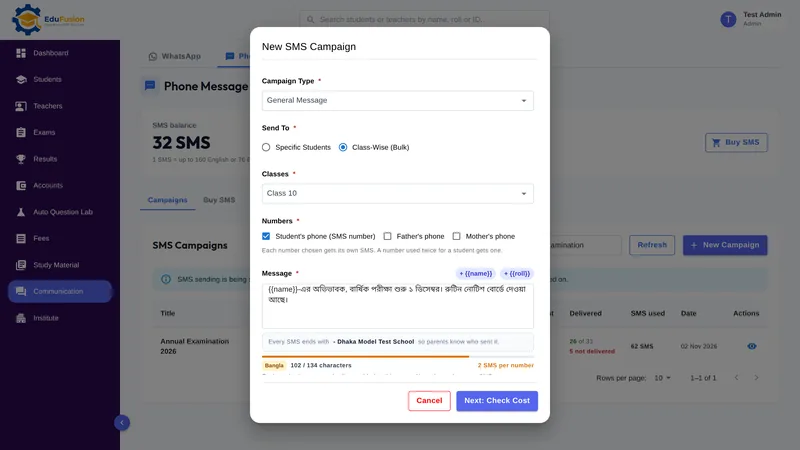
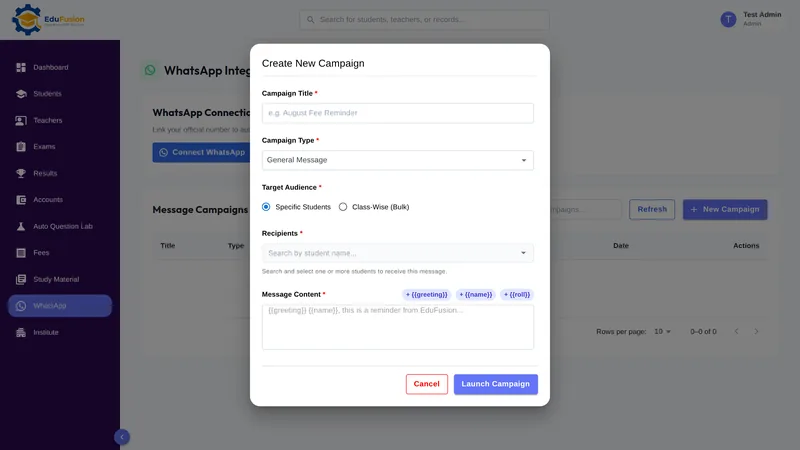
Turn on absence alerts in Attendance → Settings and choose SMS, WhatsApp or both. SMS go to the student's SMS number, the father's and/or the mother's, and are paid from your SMS balance; WhatsApp messages go from your school's own linked number, at a safe pace. A student who has signed in to the portal on their phone and allowed notifications also gets a free push notification. You can edit the message: an English one fits in 1 SMS, and a Bangla one is offered too (about 2 SMS).
Sent at a time you set, never repeated in a day
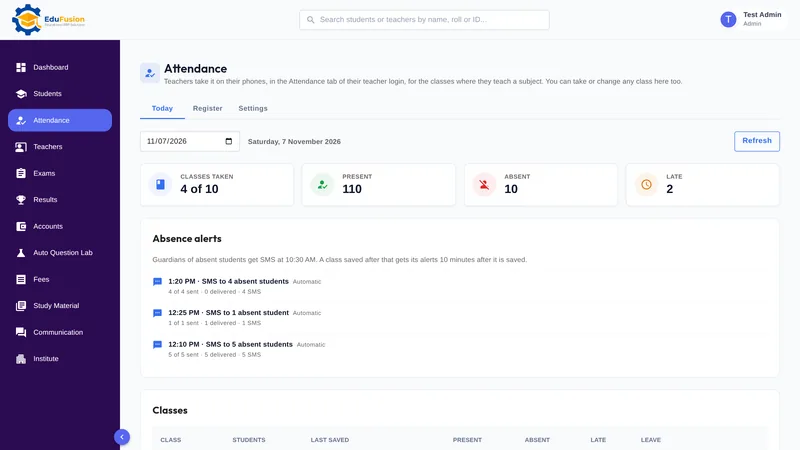
Alerts go out automatically at the time you choose (10:30 AM at first), so a wrong tap or a student who arrives late can be fixed before then. A class saved after that time gets its alerts 10 minutes after it is saved. If your school runs classes in shifts, give each class its own time, such as 2:30 PM for the day shift. If you'd rather decide each day, send them only when you press Send alerts now. A student is alerted at most once a day on each channel, and late students get an alert only if you turn that on.
Today's attendance for the whole school
The admin's Today screen shows which classes have been taken and by whom, how many students are present, absent and late, the students who aren't present, and each alert sending with how many were sent and delivered. The dashboard shows today's attendance too.
Attendance tracking: the month's register
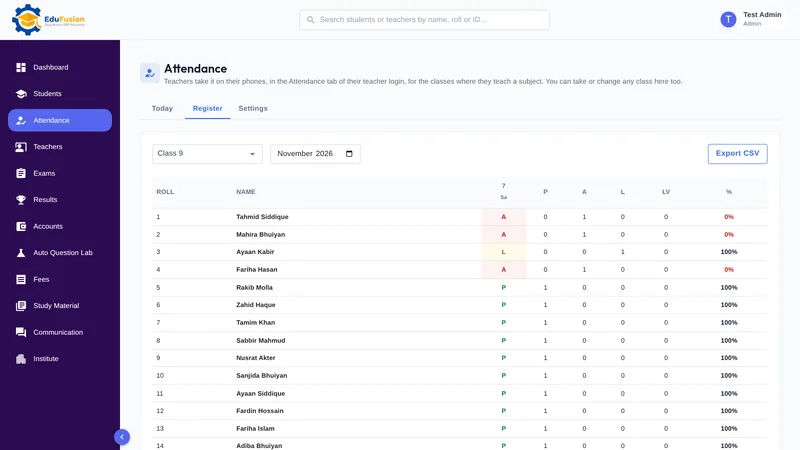
Register shows a class's month: every student's mark for each day, with present, absent, late, leave and attendance %. Export it as CSV to open in Excel. Each student's profile also has an Attendance tab.
My Attendance for students
In the student portal, My Attendance shows this month's and this session's attendance %, the days absent and late, the recent days and every day the student wasn't present. An attendance card sits on the student's dashboard too.
How it works
- Give each teacher a teacher portal login and assign the classes and subjects they teach.
- In Attendance → Settings, turn on absence alerts, choose SMS, WhatsApp or both, and set the time they go out. SMS alerts need an SMS balance.
- Each morning, a teacher of the class opens Attendance on their phone, taps the students who are absent, late or on leave, and saves.
- Before the alert time, fix any wrong tap or mark a late arrival as L; at that time, the guardians of absent students are told automatically.
- Check the Today screen during the day, and the class Register at the end of the month.
Why EduFusion for student attendance
No machine to buy
Teachers use the phones they already carry, in the browser, with nothing to install. There's no fingerprint or card machine to buy or set up.
Guardians hear the same day
Absence alerts go by SMS to any phone, or by WhatsApp from your school's own number, in English or Bangla, at a time that suits your school.
Teachers see only their own classes
A teacher signs in only after the admin gives them a login, and takes attendance only for classes where they teach a subject. Fees, SMS and settings stay with the admin.
Connected to the rest of the school
Attendance sits on the same student record as results and fees. The dashboard shows today's attendance next to fee collection, and every SMS alert appears in Communication → Phone Message.
Clear price, every feature
৳2,499 a month for up to 200 students, or ৳3,999 for up to 1,000, with attendance, results, fees and everything else included; larger schools can ask for a Custom plan. SMS are bought separately, at ৳0.40 each.
Try it free for 30 days
Set up your classes and teachers and take a few days' attendance before you pay anything. WhatsApp alerts and push notifications need no SMS balance.
Student attendance: EduFusion vs Excel vs a paper register
Excel is good at working out a month's attendance percentages, and many school offices use it for that. Here is how the four ways compare for taking attendance and telling guardians every day.
| What you need | Paper register | Excel or Google Sheets | Machine or separate tools | EduFusion |
|---|---|---|---|---|
| Taking the day's attendance | Roll call and a tick in the register | Roll call, then typed in on a computer | A scan at a machine, or another app | Tap the absent students on a phone |
| Something to buy or set up | A register book | A computer | Devices to buy and set up, for a machine | No device: the teacher's own phone |
| Guardians told about an absence | A call, if someone has time | Calls or SMS, one by one | Depends on the tool | SMS and/or WhatsApp, automatically |
| Fixing a mistake before guardians hear | Cross it out | Edit the cell | Depends on the tool | Before the alert time you set |
| Today's picture for the whole school | Collect every class's register | Once every sheet is filled in | On the tool's own screen | Today screen: classes taken, present, absent, late |
| Monthly attendance % | Counted by hand | Easy with formulas | Depends on the tool | Register with each student's %, Export CSV |
| Students and families can check | No | No | Depends on the tool | Yes, My Attendance in the student portal |
How other school software in Bangladesh handles attendance
All 10 school management products we checked on 19 October 2026 list attendance, and 9 of them list biometric, RFID or face-recognition attendance. EduFusion has no attendance machine: teachers mark attendance on their phones, so if your school wants a fingerprint or card machine at the gate, EduFusion doesn't offer that. The table shows four of the products we checked. "Not listed" means we didn't find it there, not that the product can't do it.
| Listed on the website | School360 | Eduman | ClassMate | OurCampusBD | EduFusion |
|---|---|---|---|---|---|
| Student attendance | Listed | Listed | Listed | Listed | Yes, on the teacher's phone |
| Biometric or RFID attendance machines | Listed | Listed | Listed | Not listed | No |
| Attendance SMS to guardians | Listed | Listed | Listed | Listed | Yes, at a time you set |
| Attendance alerts on WhatsApp | Not listed | Not listed | Not listed | Not listed | Yes, from your own number |
| SMS price listed | Billed separately | ৳0.40, or ৳0.60 with own brand | Credit bought separately | Credit bought separately | ৳0.40 an SMS, packages from ৳40 |
| Free trial advertised | Not listed | Not listed | 14 days | 14 days | 30 days |
Checked on 19 October 2026; prices change, so check each vendor's site.
Who it's for
Any school, college or coaching centre in Bangladesh looking for attendance software for schools that takes attendance every day and tells guardians about an absence the same day, without buying an attendance machine. Attendance is part of EduFusion's school management software in Bangladesh.
- Teachers, who take their class's attendance on their own phone instead of carrying the register.
- The office and the principal, who see the whole school's day on one screen and each class's month without collecting registers.
- Guardians, who hear about an absence the same day by SMS or WhatsApp.
- Students, who check their own attendance in the student portal.